
Business AI, made operational
AI Automation
and Business Orchestration for Modern Companies.
Connect your assistants to the systems you already use. Speedoz is an AI automation agency boosting businesses, connect their people, software, processes, data and technology through intelligent AI business orchestration.
We design and implement advanced workflow automation, MCP servers, multi-agent systems and AI intelligent agents that work together to streamline operations, improve decision-making and help your business scale.
Connected systems. Clear boundaries.
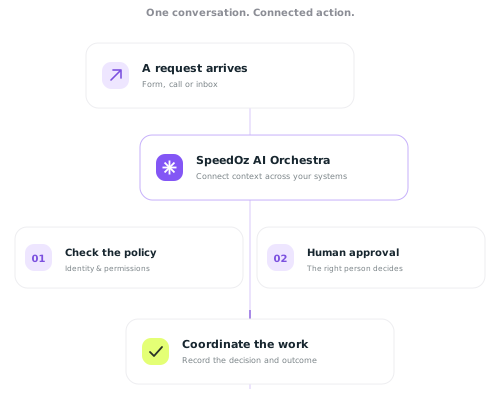
Illustrative workflow · human control at every boundary
Connect
Your systems.
One conversation.
Generative conversation across your systems and carry context from one application to the next.
36 hrs
Weekly capacity
to review
Illustrative planning model
Govern
People stay
in control.
Identity, policy and human approval are part of the route.
Observe
Make every
action inspectable.
Request → decision
Approval → outcome
Capacity example: 12 people × 6 repetitive hours × 50% suitable for assisted handling = 36 hours/week. This is gross capacity, not cash savings or ROI.
Connect ✳ Govern ✳ Orchestrate ✳ Observe
AI Automation and Business Orchestration
About Speedoz.
At Speedoz, we help businesses move beyond disconnected software and manual processes. Our AI automation agency designs intelligent systems that coordinate workflows, applications, data and AI agents across your organisation.
From automating repetitive tasks to orchestrating complex, multi-step operations, we create practical AI solutions that improve efficiency, reduce operational costs and enable your team to focus on higher-value work.
Our approach combines business strategy, automation technology and artificial intelligence to create scalable systems that support measurable growth.
Orchestration ✳
made simple. And accountable.
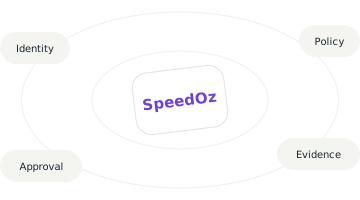
Coordinate work across your business with identity, policy, approval and evidence built into the route.
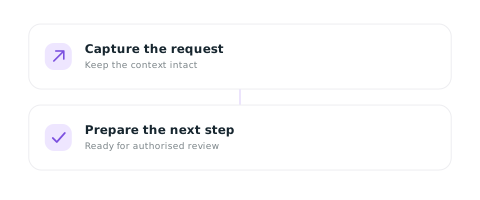
Build a useful route.
Start with the request, systems, decision boundary and evidence that matter.
Work together. Stay accountable.
People and agents act as named identities. An authorised person owns the decisions that matter.

Bring the context together.
Connect assistants through our MCP Server(Model Context Protocol) to the tools your organisation already uses.
Make the boundary visible.
A clear record follows every route, so you can review what happened and why.
01 Named identity
02 Policy before action
03 Human stop points
04 Inspectable evidence
CRM
Documents
Inbox
Looking for an AI automation agency in Australia?
Why Businesses Choose Speedoz.
Every business faces unique bottlenecks, manual workflows, scattered data, slow customer responses, or missed sales opportunities. We don’t sell generic tools; we build tailored AI solutions aligned with your compliance, strategy and KPIs.
Our collaborative approach means we:
Deep‑dive into your pain points, industry dynamics, and growth goals
Map high‑impact automation opportunities
Design, build, and integrate AI systems that fit your existing tech stack
Measure results and iterate for continuous ROI
Service desk
Approvals
Evidence
What will you
orchestrate today?
Different work. The same need for a clear boundary. Explore the routes that could make a useful first connection.
Field service
Capture an urgent enquiry once. Keep the context intact, apply service policy and prepare dispatch for approval.
Request → coordinator
Healthcare intake
Prepare administrative intake for qualified review. Keep consent explicit and clinical judgement with people.
Intake → qualified review
Professional services
Turn a request into a source-linked brief. Keep the material attributable and professional judgement accountable.
Request → reviewed brief
Your first workflow
Name the systems, the decision owner and the evidence. Build a workflow brief before building automation.
Discovery → practical scope
Illustrative operating patterns.
Connected intelligence. Human accountability.
“An AI route is useful only when its boundaries are visible.”
The SpeedOz approach to business AI
CRM
Documents
Inbox
Powered by the Model Context Protocol
Your systems.
One intelligent conversation.
Connect assistants to business context. Cross-reference information, coordinate workflows and keep each action scoped, approved and logged.
Service desk
Approvals
Evidence
◎ Frequently
asked questions.
A clearer starting point for your first practical evaluation.
01What does SpeedOz connect?
SpeedOz designs business orchestration around the Model Context Protocol (MCP), connecting assistants to the systems your organisation already uses. Discovery identifies the systems and permissions for your first route.
02Who stays in control of the decisions?
People and agents act as named identities. The route checks policy before work advances, and accountable decisions stop for an authorised person. Requests, approvals and outcomes remain available for review.
03Where should we start?
Start with one useful workflow. Bring the request, systems involved, decision owner and evidence you need. A workflow brief makes the scope concrete before implementation.
04How do we evaluate the opportunity?
Use a planning model with explicit assumptions. SpeedOz separates gross capacity from cash savings, return and implementation cost. The example on this page is directional and does not promise a customer outcome.
05 Do you integrate with my existing tools?
We integrate with 100+ platforms including Jira, HubSpot, Google Workspace, Microsoft Office 365, and many more.
ERPs, and business tools.
If your platform isn’t on our list, we can build custom integrations via API connections.
06 How long does implementation take?
Most AI Orchestration implementations are successfully done within 2-4 weeks from contract signing. And complex implementations for example enterprise solutions may take 4-8 weeks depending on scope and integrations required.